How To See All Your Downloaded Songs On Spotify
Past Justin SabrinaUpdated on September 01, 2021
Summary
Looking for a way to gratuitous download Spotify music to Android phone? This article provides 3 useful solutions to help y'all download Spotify music to Android with or without premium.
"As a Spotify music fan for many years, I accept a large number of songs on my business relationship. Recently I inverse a new Samsung phone, but I constitute that is a huge project to re-download every Spotify song I similar. Is there any better way to move downloaded Spotify music to my new phone for free? Thanks."
Android is an open up source operating organisation based on Linux. Currently, there are more than 2 billion android users worldwide. Android phones have gradually become the ideal platform for listening to music. At nowadays, more and more people prefer to use the music subscription service to download music on their Android phones for playback someday. When information technology comes to enjoying music, the first streaming service we think of is Spotify Music App. Equally a great music subscription service, Spotify Music provides premium users more than 35 million songs to download. Hither we will offer 3 primary solutions for you todownload music from Spotify to Android.
Firstly, you lot can download Spotify songs on Android phone with a premium business relationship. Secondly, you can use a third party software, Spotify music converter to pause the DRM protection, then convert Spotify songs to DRM-free MP3. After getting the Spotify MP3 files, you are able to sync to Android device for offline listening. Finally, you can try to download Spotify songs to Android phones for free through open source. Permit'southward explore together!
CONTENTS
Method 1: Download Spotify Music for Offline Playback on Android(Only for Spotify Subscriber)
Please brand sure that you lot accept installed the Spotify music app on you Android phone , and your Spotify premium account is still active.
Step ane. Run the Spotify music app on your Android phone and log in your premium account.
Stride 2. Browse the tracks y'all want to download.
Step 3. Click on the option (three vertical dots at the terminate of each track), then click on the "Relieve" option.
Step 4. At present go to "Your Media Library" and bank check under the "Shuffle" option, to discover the "Download" switch.
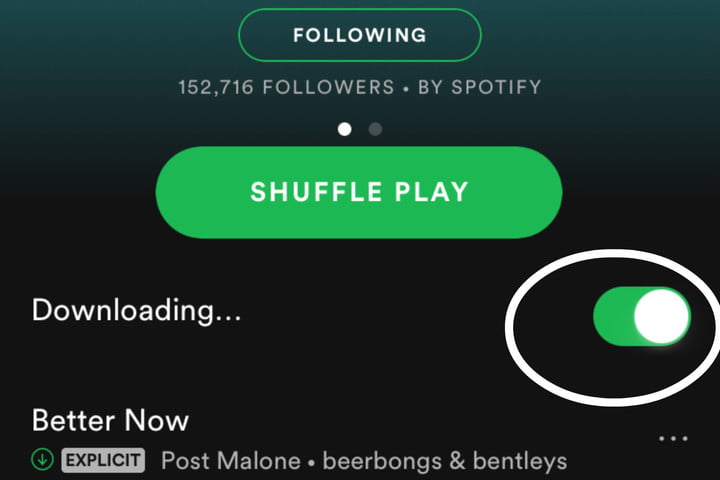
Step 5. Plough it on, and a download pointer will appear on each rails afterwards downloading
To listen to downloaded music, just:
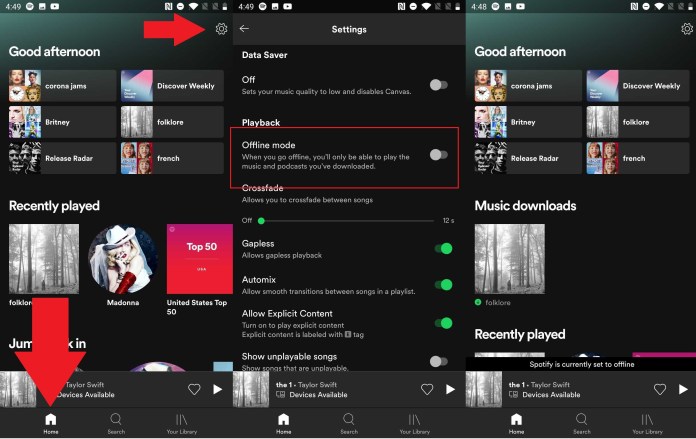
Step 6. Get to your library and click Settings, and then turn on offline mode.
Footstep 7. Now yous can click on any downloaded rails and relish Spotify songs on your Android telephone offline.
Even though Spotify Premium users can download songs for offline listening in Spotify App for Android, once you cancel the Spotify Premium subscription, yous can't listen to the downloaded songs, it means that y'all take to keep the Premium account agile, else the downloaded songs will miss from your Android telephone. Worse, you tin can't copy the downloaded Spotify songs to MP3 role player or ship to your friends either.
Wonder how to download and catechumen Aural books to MP3? UkeySoft Audible Converter is a professional and truly efficient Aural Audiobooks converting tool helps a lot to convert any Audible AA and AAX files to MP3, M4A, AAC, M4B, FLAC, OGG, WAV, AC3, AIFF losslessly and apace. With information technology, you lot could play Aural audiobooks on any MP3 role player, iPods, iRiver, Kindle, etc.
Method 2: Download Spotify Music to Android Phone for Free(All Users)
However, how do we download Spotify songs to Android phones for offline listening? How to keep Spotify music on Android phone forever? Is there whatever way to download music from Spotify to Android with Gratuitous business relationship? The reply is Yep. After reading this function, you will know how to download Spotify songs, playlist and albums to Android phone without Premium subscription. Hither we volition recommend a powerful Spotify Music Converter for Android to download and transfer Spotify music to Android, then that you lot can enjoy your Spotify songs on whatsoever Android devices freely.
Tool Required:
Spotify Music to Android Downloader - Ukeysoft Spotify Music Converter
Spotify Awarding for Windows or Mac
Spotify acccount, either Costless for Premium business relationship.
UkeySoft Spotify Music Converter is a popular Spotify music to MP3 downloader, it can assist you free download and catechumen Spotify songs to Android phone friendly-formats: MP3, AAC, WAV, FLAC. Afterwards downloading Spotify to MP3, you can transfer the downloaded Spotify songs to whatsoever Android devices, such every bit Samsung Galaxy, LG, HTC, Sony, Google Pixel, Nexus, OnePlus, Motorola, Xiaomi, Redmi, Oppo, Meitu, Windows Telephone, Sharp phones and more.
Features of UkeySoft Spotify Music Converter:
- Convert Spotify songs to MP3, AAC, WAV or FLAC format;
- Download and convert Spotify songs at 5X faster speed;
- Keeping ID3 tags and lossless quality after conversion;
- Upload the downloaded Spotify songs to Google Drive/ OneDrive directly;
- Play Spotify music with other Android Music Player, no demand Spotify app;
- Offline play Spotify music on any Android phones, Android tables and Android TVs.
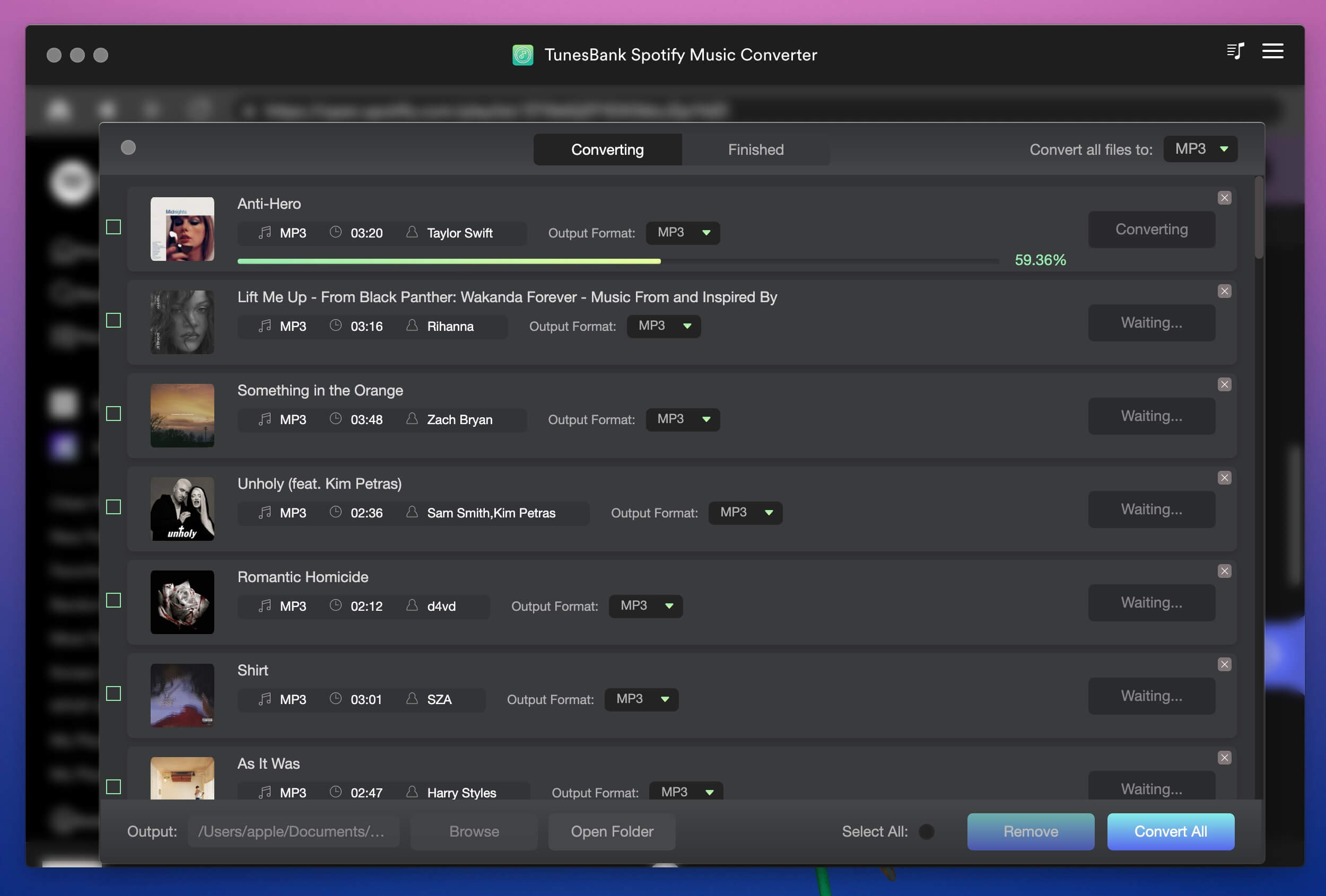
Want to go Spotify songs for free forever? TunesBank Spotify Music Converter, an application newly developed by TunesBank, allows users to continue adding songs to the "Converting" list fifty-fifty if information technology starts the conversion process. TunesBank Spotify Music Converter stands out in the market by its 5X faster conversion speed, lossless conversion and unlimited converting. Multiple formats are available, information technology supports converting Spotify music to MP3/AAC/WAV/FLAC format with ID3 tags kept, including title, artist, album, year, track number, AlbumArtist, composer, comment and genre.
How to Download Music from Spotify to Android
Step i.Launch the Spotify Music Converter
After downloading, install the Ukeysoft Spotify Music Converter and run it on your figurer (windows/mac), and then the Spotify Music app will exist opened automatically. Please make sure that you have Spotify Music app in your computer before.
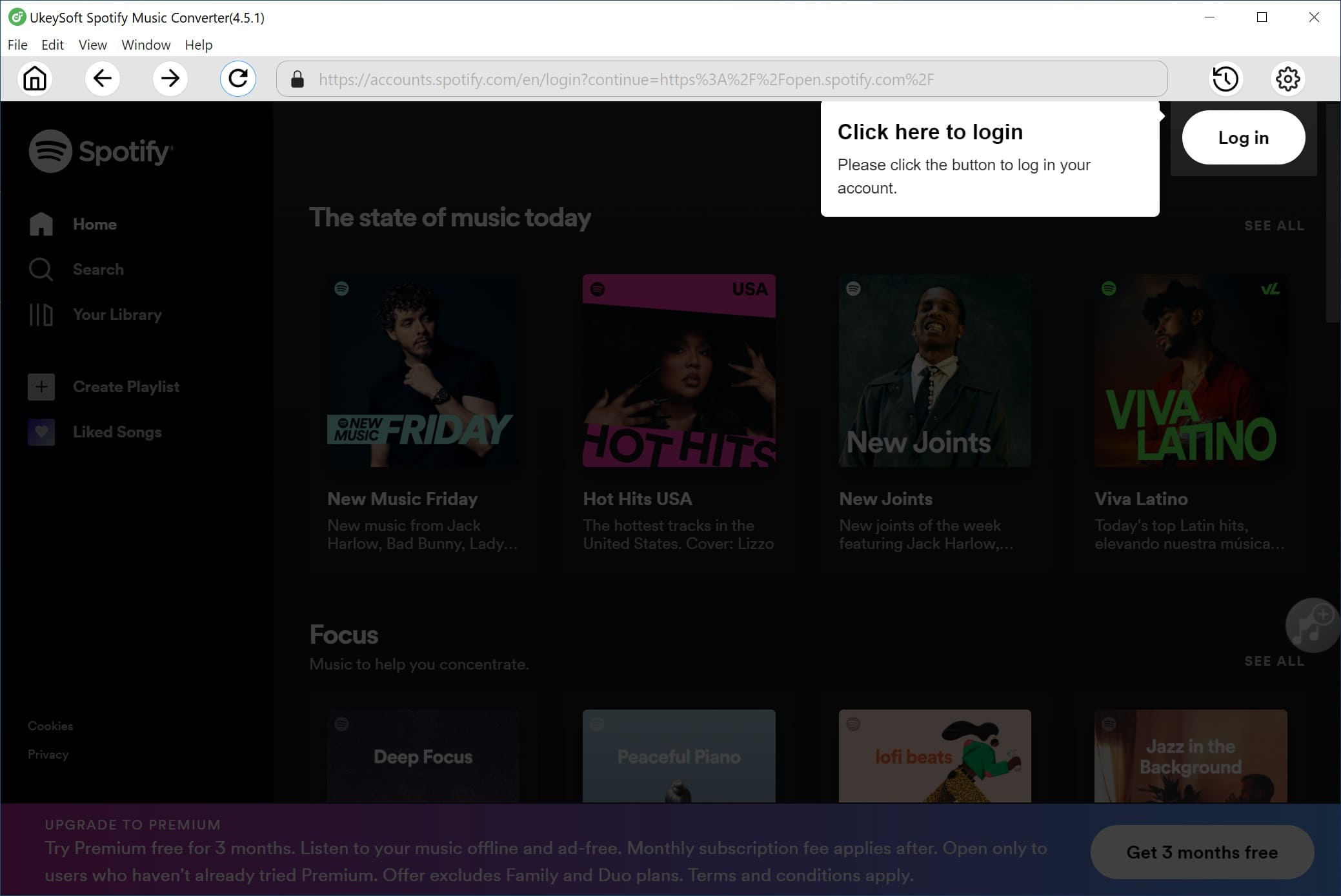
Pace ii. Add Spotify Music to the Converter
At present y'all have two ways to add together the Spotify Music to the Ukeysoft Spotify Music Converter. First one, copy and paste the songs/playlists/albums link to the search box, and then click the "add together" button.
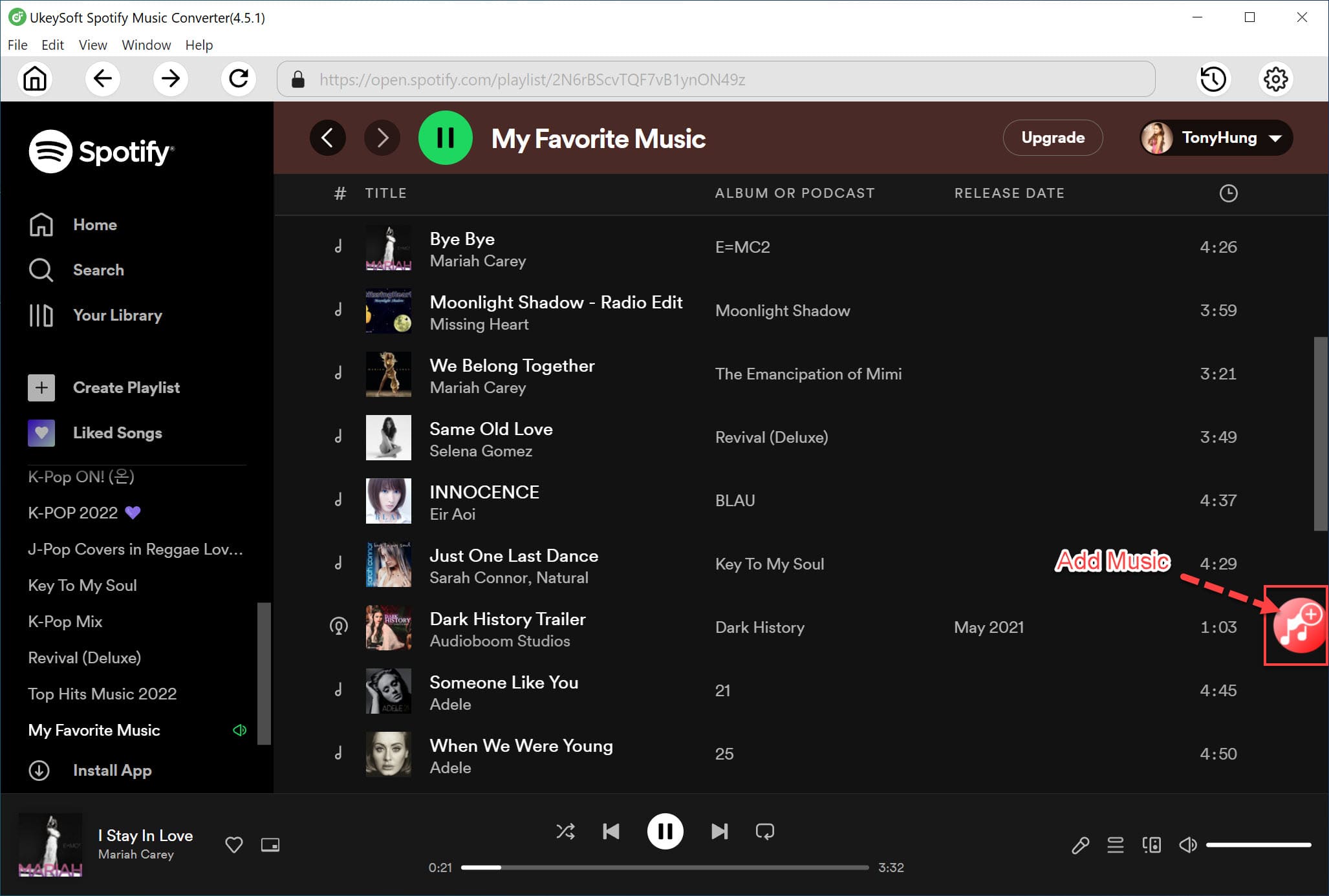
Second one, drag and drop the songs/playlists/albums you want to convert from Spotify app to the interface directly.
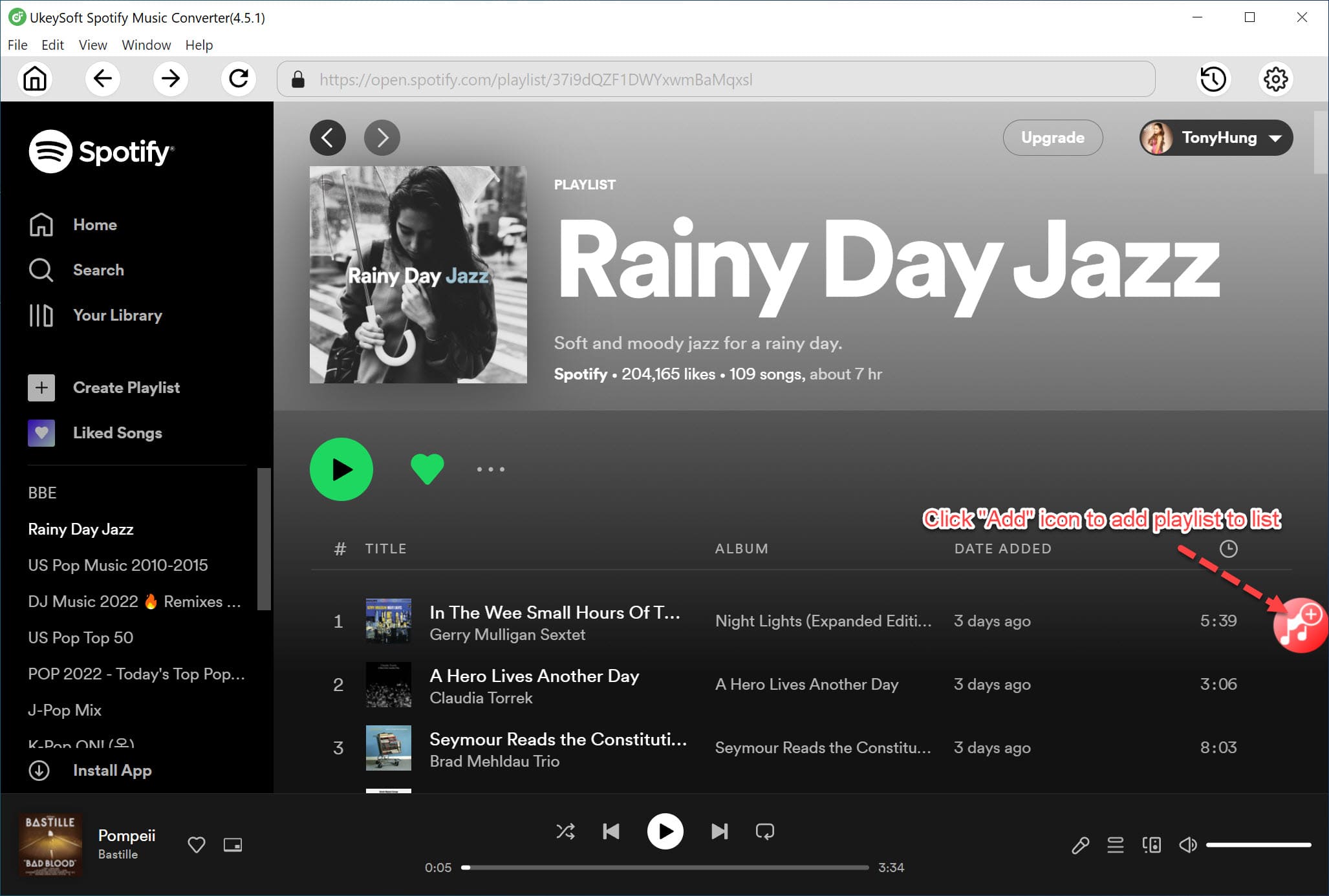
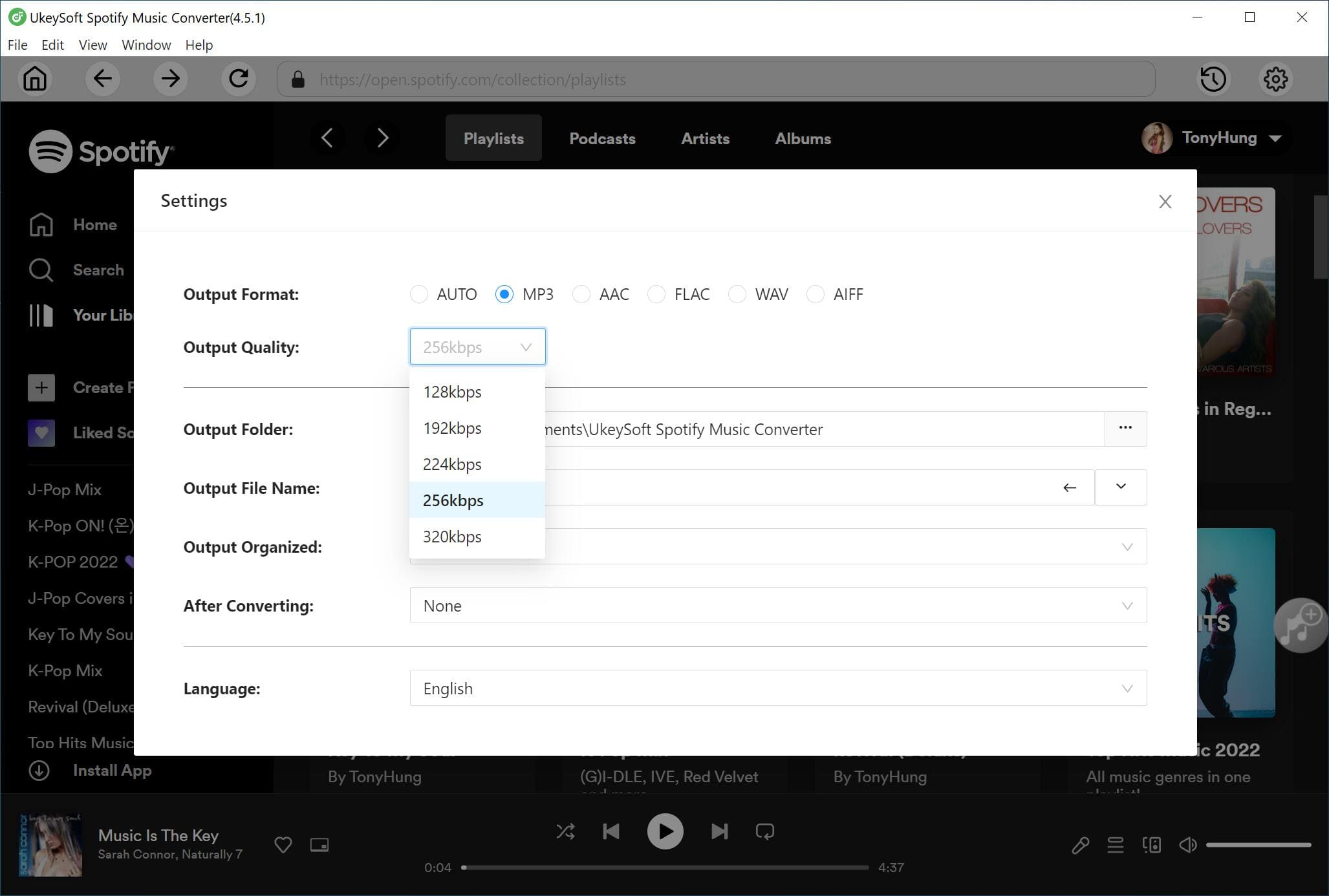
Step three.Prepare MP3 as Output Format for Android Phone
In this office, MP3 is the default format, if you want to change other output format (M4A, FLAC or WAV), click the "option" button. Also, you tin can also alter the output folder, output quality (up to 320kbps,) for your preference.
Footstep 4. Start Downloading and Converting Spotify Music
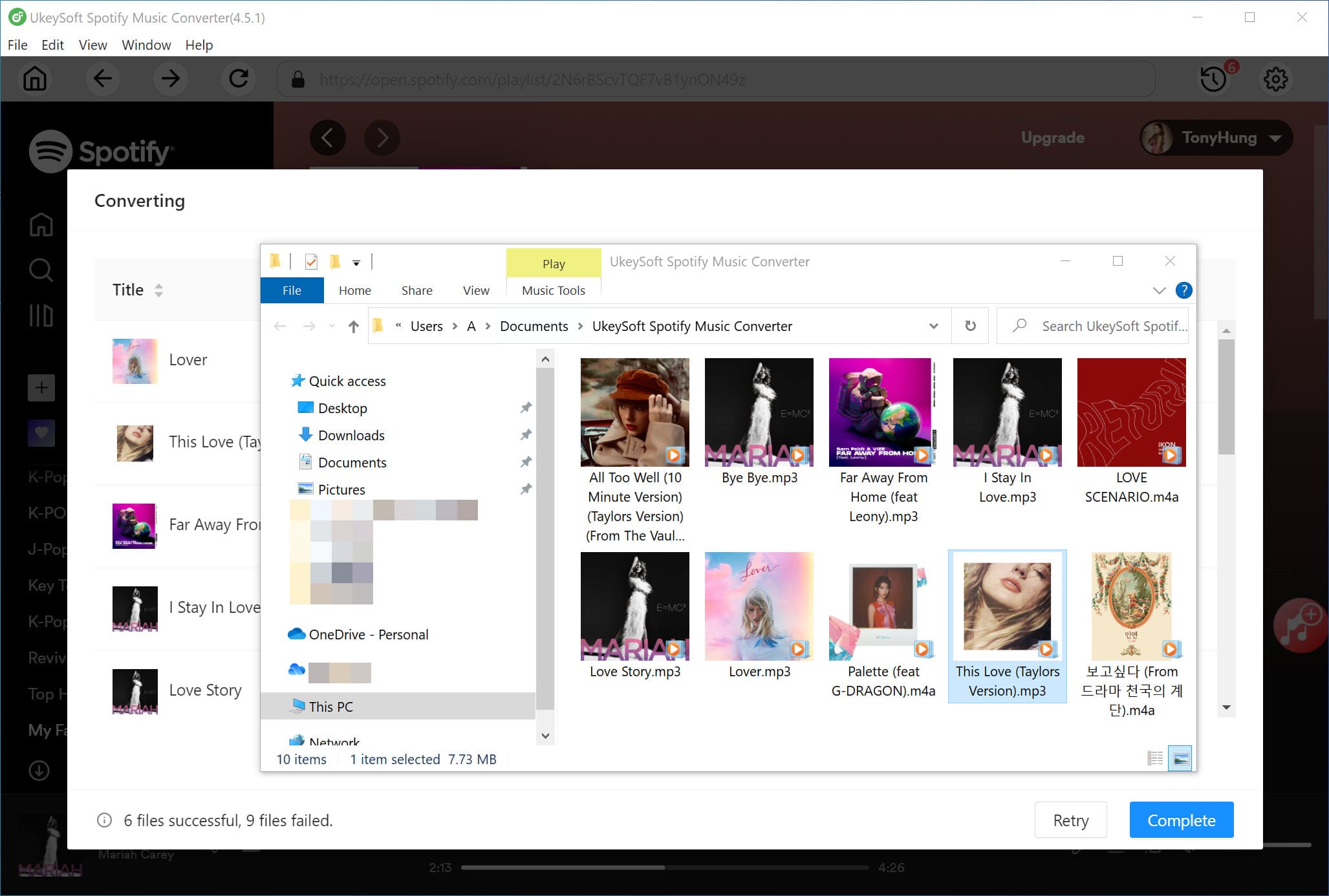
Click the "Convert" button to start conversion, yous can see as bellow interface.
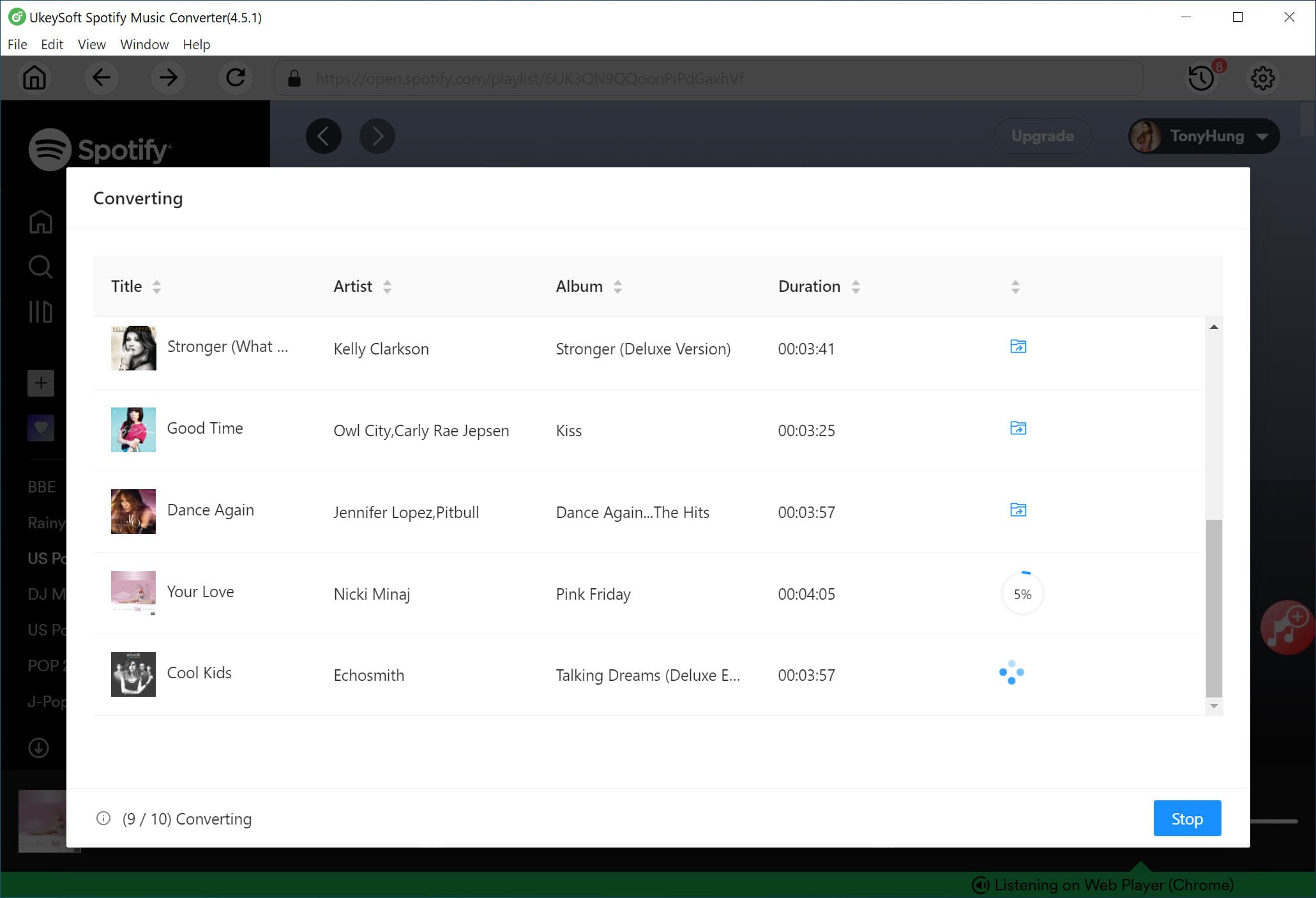
After conversion, y'all can cheque the files without losing original quality through "History".
Step 5. Transfer Spotify Songs to Your Android Telephone
Now all the Spotify Songs have been downloaded and converted successfully. Connect your android phone with the figurer via USB cable, then re-create the downloaded Spotify songs(.mp3 files) to your Android phone.
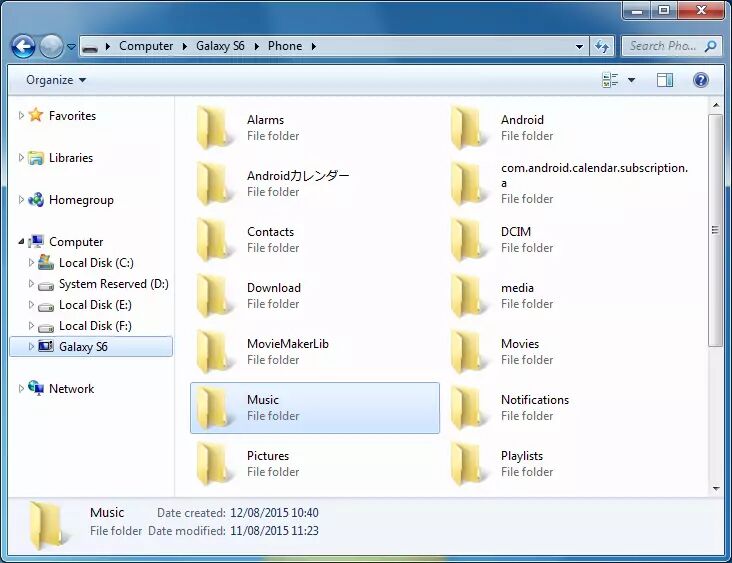
Tips: If you lot don't want to connect your phone and computer via USB, you can as well choose to remove the SD carte du jour to supervene upon this step.
Now you tin can listen to them through the built-in player or Spotify music app on your Android phone.
Method three: Download Spotify Free Music to Android Phone without Premium
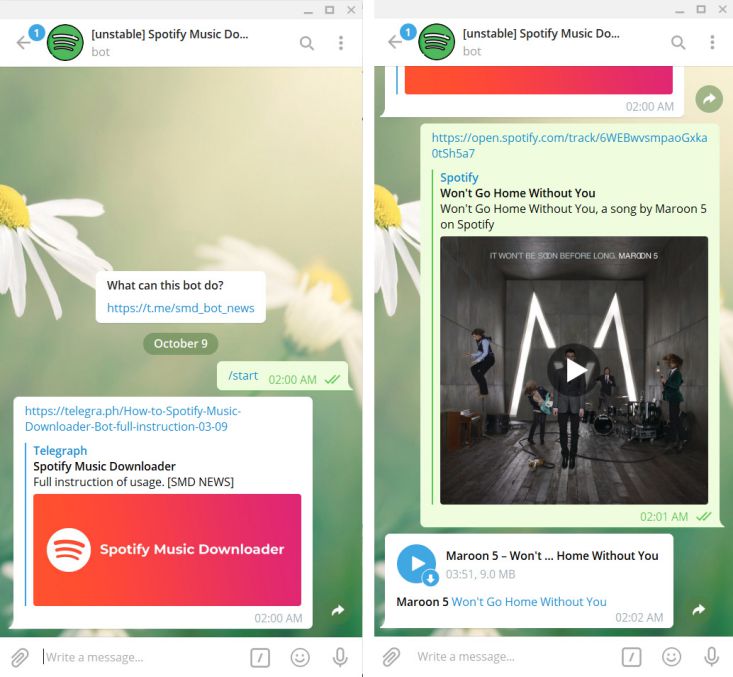
To download spotify songs without premium on Android, you tin endeavour this complimentary and open source - Telegram Bot. It works as a Musics Hunter, when you copy the Spotify song link to the bar, it will downloads the same vocal from YouTube. Notwithstanding, this open source is not stable, you lot may fail to save Spotify music to your Android telephone.
Step 1. Download both Spotify app and Telegram app on your Android phone. Then launch them, and sign in your Spotify account on Spotify app.
Stride 2. Adjacent, start Telegram app, and search for Spotify downloader in it. Cull the Telegram Spotify bot and tap on "Showtime".
Step 3. Copy the link of a Spotify song on Spotify app. And so paste the link to the chatting bar of Telegram, and click the "Transport" push.
Step four. Adjacent, beginning Telegram app, and search for Spotify downloader in it, and cull the Telegram Spotify bot.
Stride 5. Hit on the "Download" to go Spotify MP3 songs from YouTube on your Android phone.
FAQs about Downloading Spotify Music to Android Phone
The post-obit are common questions and answers nigh downloading Spotify music to Android phones.
Q1: Tin can I download music from Spotify to my Android Phone?
A: Yes, you can download Spotify music on Android device, iOS device and computer if you bring together the Premium program.
Q2: How do I listen to Spotify offline on Android?
A: In one case you have downloaded songs from Spotify to your Android phone, you tin click the "Habitation" and "Settings" icons in plow, so enable "Offline". And so, y'all tin heed to the downloaded Spotify music on your Android phone in offline manner.
Q3: How practice I Download Spotify Songs to my Android for free?
A: To download Spotify songs to Android for free, you can try the Telegram Bot. Simply it actually downloaded the same Spotify songs from YouTube instead of downloading real music from Spotify. In contrast, UkeySoft Spotify Music Converter is worth a attempt, it is a real Spotify Music Downloader & Converter.
Q4: Is at that place any complimentary Spotify Music Downloader for Android?
A: To be honest, so far, it seems that there is no complimentary and professional person Spotify music downloader for Android. Some Spotify music downloaders on the market that claim to be complimentary are actually only recorders with express audio quality. You lot tin utilize UkeySoft Spotify Music Converter to export MP3 songs to your local computer, then move them to your Android telephone.
Final Word
Now yous've got iii means to download music from Spotify to your Android phone, you tin can mind to them offline on your Android phone any fourth dimension, anywhere. If you savour the Spotify Premium features, then you can download Spotify music on your Android telephone with a valid Premium account. Besides, y'all can utilize the costless tool to download Spotify Free music to Android devices, merely you may neglect to become high-quality Spotify music. If yous prefer to download music from Spotify to Android with a Spotify Free account, UkeySoft Spotify Music Converter could be the top and all-time selection. Though it does non download Spotify music to Android phone direct, it can help you salvage Spotify music on computer forever for free, then you can copy and transfer the Spotify MP3 songs to your Android phones, Android tablets and devices for offline listening, as well as iPhone, iPods, iPad, Sony Walkman, MP3 role player, Amazon Burn down Hard disk, PSP and more devices. What's adjacent? Download UkeySoft Spotify Music Converter now!
Download Spotify Music For Free
Comments
Prompt: y'all demand to log in before you can comment.
No account yet. Please click here to register.
DOWNLOAD HERE
Posted by: smithupoldn.blogspot.com


0 Comentarios